For the lifts you come back to

Your form.
Measured.

Personal form feedback for your squat, bench press, and deadlift. A closer look at each rep, and something specific to work on when your next set starts.

Fevo AI for iPhone is coming to the App Store.

Three lifts to start. More to come.

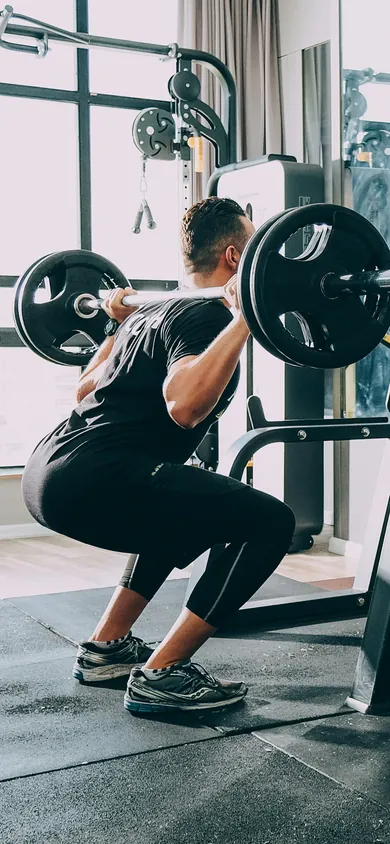
Illustrated example Stock photo. The overlay is drawn for illustration. Illustrated example of the recording screen: a stock photo of a lifter at the bottom of a back squat, seen from behind and to one side, with the app’s tracking overlay drawn on top.

Three lifts

Squat. Bench. Deadlift.

Fevo AI checks all three, each from the camera views it supports. More exercises will follow.

  • SquatFrom the side or the front
  • Bench pressFrom the side or the foot of the bench
  • DeadliftFrom the side or the front

Injuries suck.

They can take you away from the training you enjoy. Here’s a look at exercise-related injuries in the U.S.

564,000

Estimated injuries involving exercise or exercise equipment treated in U.S. emergency departments in 2024.

CPSC report · Table F ↗

84,000

Estimated weight-training injuries treated in U.S. emergency departments in 2023.

Jhaveri et al. · NEISS study ↗

These estimates cover different years and overlapping categories; they should not be added together. They do not show that poor form caused the injuries, or that an app can prevent them.

See it for yourself

Your set, made clear.

Record your lift. See what changed. Know what to focus on next.

Illustrated example Movement, load, timing, and feedback are synthetic.

  • Squat
  • Deadlift
  • Bench press

Different lifts. Different views. One clear review.

Squat and deadlift from the side or the front, bench press from the side or the foot of the bench. Each view covers its own checks.

Set summary

Squat, illustrated set: where the feedback lands Illustrated side view of a lifter. At rest the figure stands after the example set of eight squats, with the chest and hips lit where this set’s feedback landed; the accompanying legend names each region and what was noted there, and a third finding, about the speed of the way down, that no region shows. During a replay the same figure performs the eight reps, and the status pill above it and the outcome pills under it name each rep, phase and outcome as they happen.
  • AdditionalChest Chest dropping on the way up · rep 8
  • AdditionalSpeed Control on the way down · rep 2
  • AdditionalHips Depth · rep 7
  • Heels Not lit in this example.
  • Knees Not lit in this example.

Additional: everything this set showed. In the replay, a white ring marks a rep that reached depth.

Illustrated example Where this set’s feedback lands. Lit regions mark this example’s findings on the body; the legend lists every finding, speed included.

Depth, speed and chest.

Set results

Squat · Fri Aug 28 · 8 reps at 185 lb · Side view

Example

5 of 8 reps with nothing to fix

MikeAI-Powered Personal Trainer

Your chest dropped on the way up on rep 8 at 185 lb. Keep your chest up as you drive out of the bottom, and lower with a steady count.

Additional

Chest dropping on the way up

Moderate

1 of 8 reps dropped the chest on the way up (rep 8).

Try this

Brace before you go down and keep your chest up as you drive out of the bottom.

Control on the way down

Minor

1 of 8 reps dropped into the bottom quickly (rep 2).

Depth

Minor

1 of 8 reps stopped above parallel (rep 7).

From the front

Your side view covered these checks. Film your next set from the front to see more.

Knees caving in · Hips shifting to one side · Toes lifting · Uneven finish at the top

Also measured

Knee angle at the bottom, hip height at the bottom, torso angle at the bottom, lowering time through the middle and extra knee bend at the top, on every rep.

Rep by rep

  1. Rep 1, nothing to fix
  2. Rep 2, has a finding
  3. Rep 3, nothing to fix
  4. Rep 4, nothing to fix
  5. Rep 5, nothing to fix
  6. Rep 6, nothing to fix
  7. Rep 7, has a finding
  8. Rep 8, has a finding

Reps 2, 7 and 8 have a finding.

The set results screen for the illustrated example.

Meet Mike

A coach who knows your sets.

Mike writes each set’s results in plain words and answers your questions about your lifting. He’s an AI, not a person, and he’s optional.

MikeAI-Powered Personal Trainer

Illustrated example · Jordan and the sets shown are fictional, and Mike’s answers here were written for this page. They are not advice for you.

Try a question

Mike

AI-Powered Personal Trainer

Asking about Squat · Fri Aug 28

You: What should I fix first?

Start with your chest. On Friday’s squat at 185 lb, it dropped on the way up on rep 8.

Why it matters:

A sudden chest drop tips your weight forward and shifts the work to your back.

Do this:

Brace before you go down and keep your chest up as you drive out of the bottom. Then lower with a steady count.

Should I add weight next time?

The coach screen for the selected example question.

Your findings, in plain words. Mike explains the findings you can view, most important first, and names the set he’s talking about.

A question before the answer. When one detail would change his advice, Mike asks first. An answer about your setup can go into your coach notes.

Pain isn’t Mike’s call. Mike doesn’t weigh in on pain or symptoms. He’ll point you to your physical therapist or doctor instead.

How it works

A place for feedback in your routine.

  1. Set your phone.

    Choose your lift and follow the camera setup for that movement.

    Squat Side view

    Room

    • One person
    • Phone steady
    • Enough light

    Position

    • Whole body
    • Side view
    • Standing stillChecking…

    Checked after you tap Start

    How many of your squat reps will reach parallel?Best guess is fine.

    Every repMostAbout halfFewer than halfNot sure

    Start

    Record a set: the lift, the view and the checks before you start.
  2. Film your set.

    Focus on your lifting. When you stop, Fevo AI checks the set and then shows your results.

    Recording: the set label, the time and the rep counter. Stock photo. The overlay is drawn for illustration.
  3. Find your next focus.

    Look through every rep, ask Mike about it, and take one thing into your next set.

    Bench pressPicked from your push day

    This week1 of 3 filmed · 8 weeks in a row

    Working set weight

    Working weight185lbTop set today Set score41Today’s set Sleep6.6hLast night

    Recent sets

    See all
    Bench pressSide view · 5 at 185 lb
    Mon Oct 12
    SquatSide view · 8 at 205 lb
    Fri Oct 9
    DeadliftSide view · 5 at 245 lb
    Wed Oct 7
    Bench pressSide view · 5 at 180 lb
    Mon Oct 5
    Home: Jordan’s week, working weight and recent sets, with the Ask Mike box.

Pricing

Start free. Keep going with Premium.

Your first few sets and questions to Mike are free. Premium checks every set you film, with every finding and its fix.

  • Unlimited sets and coach questionsFair use applies.
  • Every finding and its fix
  • Rep by rep, on every set

Fair use, in plain words

  • Many questions in a few minutes? Mike asks you to wait a moment.
  • A very heavy day of questions? Answers slow down, then Mike pauses until tomorrow.
  • A very long day of filming? We ask once if you’re still filming. It never stops you.

Premium

  • 3 days free

    Yearly

    $59.99 a year

    $5.00 a month

    3 days free, then $59.99 a year

    3 days free, then $59.99 a year. Renews automatically each year until you cancel. Cancel in Settings at least 24 hours before the free days end and you pay nothing. The sets you filmed stay yours to view.

  • Monthly

    $9.99 a month

    Billed monthly, no free days

    $9.99 a month. Renews automatically each month until you cancel. Cancel in Settings at least 24 hours before a renewal to skip it. The sets you filmed stay yours to view.

Prices in US dollars, billed through the App Store. You choose a plan in the app.

Your privacy

Your training stays personal.

Your movement is personal. You choose what stays on your phone and what you share.

The policies cover today’s test builds. They’ll be updated before Fevo AI is on the App Store.

  • Your sets are checked on your phone.

    By default, your sets are saved as movement data: joint positions, not video. Turn on “Keep my videos” to keep footage on your phone, for the period you choose.

  • Sharing is your choice.

    Contributing footage requires consent for each clip, with faces blurred on your phone first. Mike is optional. When you turn him on, your questions and recent chat, your coach notes, three of your onboarding answers and a summary of your sets go to the AI service that writes his words. Never your video.

  • Sleep from the Apple Health app stays on your phone.

    If you connect the Apple Health app, Fevo AI reads your sleep to show it beside your sets. It’s read only, stays on your phone and never goes to Mike.

  • No ads. No selling your data.

    The policies explain what is stored, how long it is kept, and how to delete it.

Privacy

Videos

Keep my videosoff

Apple Health

Sleep from Apple Healthoff

Sharing

Contribute my clipsoff

Delete my data

Illustrated example The Privacy screen: every switch off, as the app starts.

A few things
worth knowing.

Which exercises will Fevo AI support?

Squat, bench press and deadlift. Squat and deadlift can be filmed from the side or the front, and bench press from the side or the foot of the bench. More exercises will follow.

Do I need special equipment?

A supported iPhone, a stable place to set it, and the equipment for your lift. Camera placement depends on the movement; the app’s setup guidance will help you get the right view.

Who is Mike?

Mike is Fevo AI’s AI-powered personal trainer. He’s an AI, not a person. He writes your set results in plain words and answers your questions about your lifting. He’s optional: without him, your results use the app’s own wording.

How do I cancel Premium?

In the app, open Profile › Plan and billing, or on your iPhone open Settings › your name › Subscriptions. Cancel at least 24 hours before your plan renews to skip the next charge. The sets you filmed stay yours to view.

How does Fevo AI keep improving?

Lifters can choose to contribute clips of their sets and tell us when a finding looks wrong. Both help improve Fevo AI. Contributing is your choice, with consent for every clip and faces blurred on your phone before upload.

Can Fevo AI prevent an injury?

Fevo AI has not been shown to reduce injuries. It does not predict whether a rep is safe or decide whether you are ready to train. Questions about pain or readiness belong with your physical therapist or doctor.

Coming soon

Fevo AI is coming to the App Store.

Film a set, see every rep and ask Mike what to work on next. Your first few sets are free.

Fevo AI for iPhone isn’t on the App Store yet. The download link goes here as soon as it’s live.

Get notified when it’s out.

Leave an email address, a mobile number or both. We’ll tell you when Fevo AI is on the App Store, and about a beta if one opens first. Being on the list doesn’t reserve a place in a beta.

If no form shows here, email support@fevoai.app and we’ll add you to the email list.

US mobile numbers only.

Lifts you train (optional)

Fevo AI is for adults 18 and over. We use your email address and mobile number only for these messages and for keeping this list, and never sell them or share them for anyone else’s marketing. Section 4 of our Privacy Policy has the details.

Questions or support

Email support@fevoai.app. For privacy requests, email privacy@fevoai.app.